
MA Trade Assistant
MA Trade Assistant Features and Manual Trading Workflow in MT5
Organised around what you want to do: size a trade, send it, follow your rules and manage it after entry.
Core MT5 Trade Management & Risk Sizing Features
Lot size from your risk
Type how much you accept to lose (an amount, or a percentage of balance, equity or free margin) and your stop loss. The panel gives you the correct lot. Eight risk modes are available, including a percentage of the previous day, week or month balance.
Findings card before every order
A short list of plain warnings: wide spread, news coming, risk too high, stop too tight or too wide against ATR, weak risk/reward, trading against the daily trend, not enough margin, or Algo Trading switched off.
News guard
Reads the MetaTrader 5 economic calendar. Each event shows its impact, the forecast and previous values, and how it relates to the symbol on your chart. The guard can block new entries around events and can close trades before them (off by default).
Spread intelligence
Compares the live spread with the normal spread of the symbol and grades the cost against ATR, so you see when a trade is too expensive to take.
Prop firm rules tab
You enter the rules of your challenge (initial balance, profit target, daily loss, maximum drawdown, minimum days). The panel shows your progress with bars and can close everything and lock trading when your daily limit is hit.
Plan tab for the session
ATR on D1 and on the chart, today's range, previous day and week levels, VWAP, a tick-volume profile with POC, VAH and VAL, the auction context (where price opened versus yesterday's value) and the D1 trend.
Nine trailing-stop modes
Points, Fractals, Moving Average, Parabolic SAR, ATR, Partial Close, High/Low bar, Step and Smart Stop (swing plus ATR padding).
Up to four partial take-profit levels
Close a part of the position at 1 to 4 levels, TP1 to TP4 (distance and percent of volume) and optionally move the stop loss to break-even after TP1.
Break-even and pending-order tools
Automatic break-even with offset, trailing pending orders, OCO orders, hidden SL/TP and virtual pending orders.
Many symbols, one panel
Work on the current chart only, or manage all symbols together. A symbol switcher sits at the top of the panel.
Candle countdown timer
A small text on the chart shows how much time is left before the current candle closes, so you can wait for the close before you act. It also tells you when the feed has stopped, and it can alert you before the close or when a new candle opens.
Manual MT5 Trade Execution Workflow in Four Steps
- 1
Set your risk once
Choose the risk mode (for example % of balance) and the value (for example 1.00). This is the part you keep between trades.
- 2
Set your stop loss and target
Enter the stop loss in pips (or points, price or money), or take it from ATR or the last swing. Choose the risk/reward ratio (for example R/TP 2.00 and R/SL 1.00). The panel calculates the take profit and the lot.
- 3
Read the findings card
If something is wrong (wide spread, news in 20 minutes, risk too high) the card tells you in simple words. If a hard rule is broken, the Sell and Buy buttons show BLOCKED.
- 4
Send the order and let the panel manage it
Press Sell or Buy. After entry the panel can move to break-even, trail the stop, take partial profits and warn you about the next news.
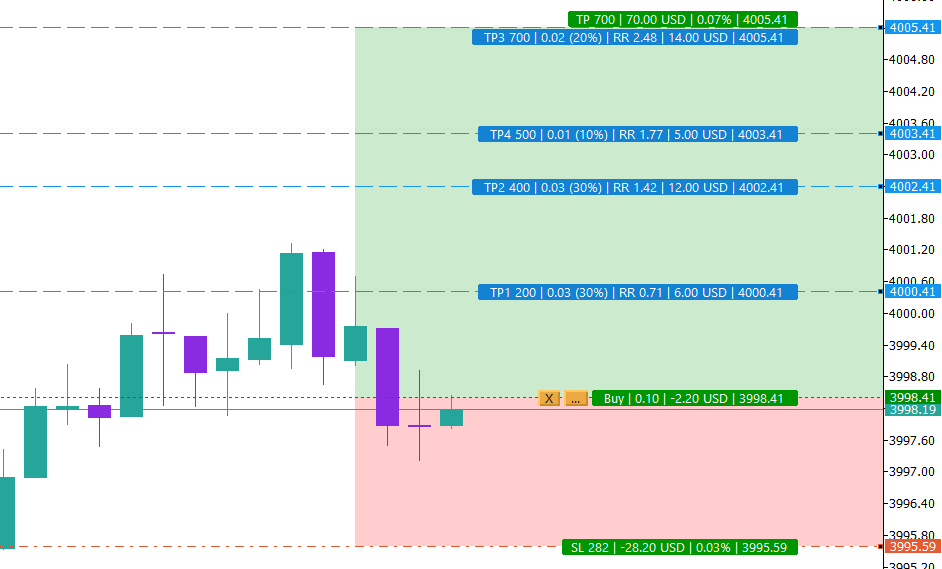
Draggable Partial Take-Profit Lines (TP1 to TP4) on the Chart
TP1 to TP4 are drawn on the chart as lines you can drag. Each label shows the points, the lots, the risk/reward, the money and the price. You set the levels in MORE, then Split.
Detailed Guide to the ORDER, TRADES, PROP & PLAN Tabs
ORDER, TRADES, PROP and PLAN are explained below. The MORE tab is explained in Settings and advanced options. Settings and advanced options
ORDER tab: build and send the trade
Everything you need to size and send an order.
- Shot
- Takes a screenshot of the chart now.
- Show
- Shows or hides the entry, stop loss and take profit lines on the chart.
- Time
- Opens the Trade Time Manager. Schedule an action at a chosen time: Buy, Sell, Close Buy, Close Sell, Close All or exit MetaTrader, with weekday repeat.
- Bell
- Alerts you when price touches your support or resistance lines.
- Pips / Points / Price / Money
- One unit button for the whole panel: type the stop loss and take profit in pips (default), points, an exact price or an amount of money. The pip follows the symbol type, and the panel shows its definition.
- RR
- Calculates the take profit from your risk/reward ratio.
- Lot calc
- ON: the lot is calculated from your risk. OFF: you type the lot yourself.
- SL: Manual / ATR / Swing
- Where the stop loss comes from: your own number, an ATR-based distance, or the last swing (with ATR as fallback).
- Lines
- Draws entry, stop loss and take profit lines on the chart and lets you drag them.
- Risk read-out
- Shows the money at risk, the spread and the commission per lot.
- R/TP and R/SL
- Your risk/reward targets. For example 2.00 and 1.00 means you aim to win twice what you risk.
- Risk − / + and risk mode
- The risk value and how it is measured: currency amount, % of balance, % of equity, % of free margin, % custom base, or % of the previous day, week or month balance.
- LOT
- The calculated lot, shown with the allowed minimum and maximum for the symbol.
- ENTRY
- “market” for an instant order, or a price or points for a pending order.
- TAKE PROFIT and STOP LOSS
- Distance in the chosen unit (pips by default), an exact price in Price mode, or an amount in Money mode.
- Comment
- A text saved on the order.
- Sell · Buy · Stop · Limit
- Choose the direction and whether the order is market or pending (Stop or Limit).
- Fn
- Shows the list of hotkeys.
- Big Sell and Buy buttons
- Send the order. A double-click protection avoids accidents, and BLOCKED appears when a hard rule is broken.
- Findings card
- Plain warnings: spread, news, risk, stop size, risk/reward, daily trend, margin and Algo Trading.
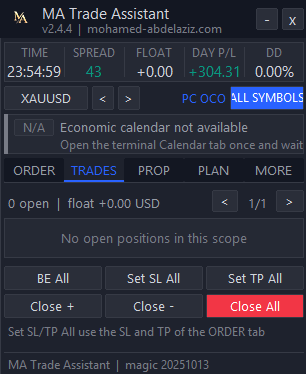
TRADES tab: manage open positions
One card per open position (4 cards per page with < 1/1 > pagination).
- Position card
- Symbol, direction, lot, profit, open price, R multiple, stop loss and take profit.
- BE
- Moves this stop loss to break-even.
- …
- Opens the per-position menu: Close, Close and sell/buy (reverse position), Move SL to BE + offset, Hide SL/TP toggle, Close position % (25 / 50 / 75), Edit SL/TP from panel, Trailing Stop On/Off, Break-even On/Off, Partial Close On/Off, Color and Comment.
- X
- Closes the position.
- BE All · Set SL All · Set TP All
- Apply break-even, or the stop loss and take profit from the ORDER tab, to all positions in scope.
- Close + · Close − · Close All
- Close only the winning trades, only the losing trades, or everything.
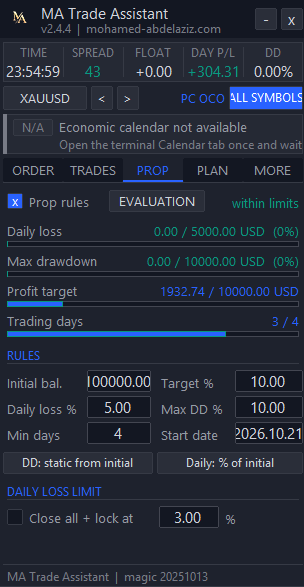
PROP tab: your challenge rules
You type the rules of your prop firm. The panel does not connect to any firm and is not affiliated with one.
- Prop rules (on/off)
- Turns the tracking on. The status shows EVALUATION or FUNDED and whether you are within limits.
- Progress bars
- Daily loss, maximum drawdown, profit target and trading days, each against its limit.
- Initial balance · Target % · Daily loss % · Max DD % · Min days · Start date
- The numbers of your challenge.
- DD: static / trailing
- Choose how the drawdown is measured, from the initial balance or trailing.
- Daily: % of day start
- Choose the base used for the daily loss.
- Daily loss limit + lock
- Set your own limit in percent. When it is reached the panel closes everything and blocks new orders for the day.
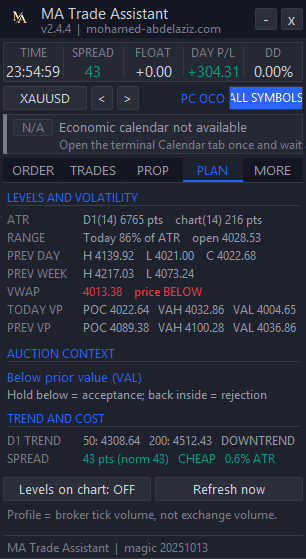
PLAN tab: your map for the session
A quick read of the market before you trade.
- ATR · RANGE
- Average daily range, and how much of it today's range already used.
- PREV DAY · PREV WEEK
- High, low and close of the previous day and week.
- VWAP
- Volume-weighted average price and whether price is above or below it.
- TODAY VP · PREV VP
- Tick-volume profile of today and of the previous day: POC, VAH and VAL.
- Auction context
- Where price opened compared with yesterday's value area, and what acceptance or rejection would mean.
- D1 trend and spread grade
- Position against the D1 SMA 50 and 200, and whether the current spread is cheap or costly against ATR.
- Levels on chart · Refresh now
- Draw the levels on the chart, or recalculate immediately.
MetaTrader 5 Chart Keyboard Shortcuts (Hotkeys)
With Hotkeys switched on in MORE, Setup, these keys work on the chart.
- B
- Buy
- S
- Sell (always with the confirmation window)
- C
- Close all (press twice within 3 seconds)
- E
- Move to break-even now (press twice within 3 seconds)
- L
- Show or hide the lines
- T
- Lot calculation on/off
- R
- Risk/reward on/off
- H
- Hide or show the panel
- X
- Clean chart lines (remove panel overlay lines)
- + / −
- Increase or decrease the risk
- 1 – 9
- Timeframes: M1, M5, M15, M30, H1, H4, D1, W1, MN
- Esc
- Cancel an armed order
Free Download & MetaTrader 5 Setup
Install free in one click from the official MQL5 Market, attach it to your chart in MetaTrader 5, and enable Algo Trading.
Discover how different charting types — from Time and Tick to Volume Profile and Footprint — change your market perspective and execution.
Free MA TradeLab (v2.5.3): Institutional trading journal, personal & trading financial management, prop firm risk engine (PFIE), studio audio news alerts, and direct localhost syn…
A structured approach to understanding how markets really move — through order flow, volume, and liquidity.