
Tools
MA Trade Assistant — Free Trade Panel & Risk Calculator for MetaTrader 5
You decide the trade; MA Trade Assistant handles the execution math and discipline in MetaTrader 5—calculating exact lot size from your risk, checking spread and high-impact news before you click, guarding your prop firm daily drawdown limit, and managing partial take-profits and trailing stops after entry.
Version 2.5.2 · MetaTrader 5 desktop · Installed from MQL5 Market · Free for personal trading
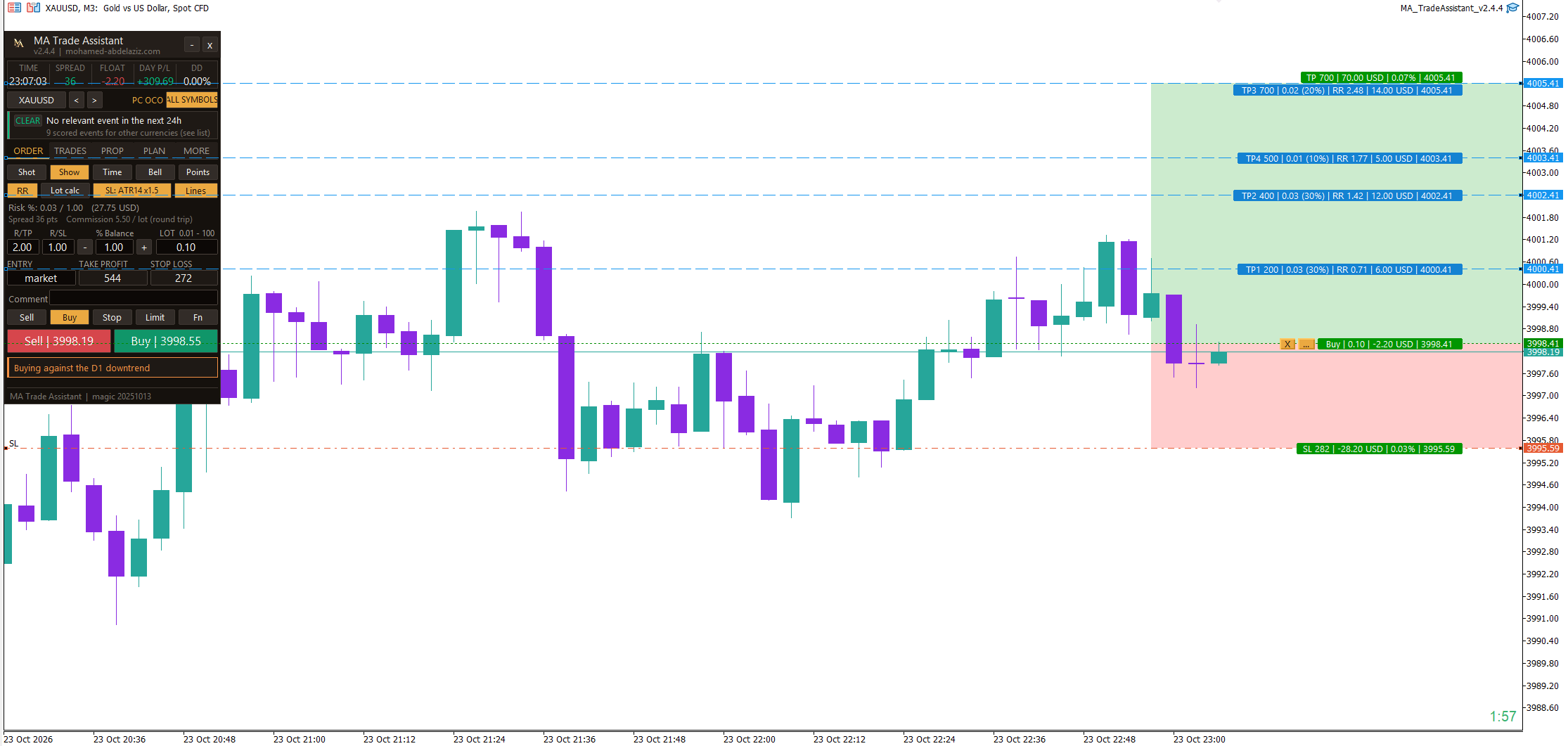
What Is MA Trade Assistant for MetaTrader 5?
MA Trade Assistant is a free on-chart trade execution and risk management panel for MetaTrader 5 (MT5). It is not an automated trading robot and it does not generate buy or sell signals. You decide every trade; the panel handles the position-size calculation, pre-trade safety checks, prop firm challenge limits, and post-entry trade management.
Most trading mistakes are not about the entry itself. They happen because of an oversized lot, an order placed minutes before a high-impact economic news release, an abnormally wide spread, or a daily drawdown limit breached without noticing. MA Trade Assistant is built to catch these exact execution errors before the order leaves your terminal.
It is designed for discretionary manual traders of forex, gold (XAUUSD), indices, and crypto CFDs on MetaTrader 5—and especially for prop firm challenge traders who must strictly respect daily loss and maximum drawdown rules.
What is new in version 2.5.2: the pip follows the symbol type (0.10 on gold, 1.0 on indices and crypto, 0.0001 on forex), and a new input sets it for single symbols. TP, SL, entry and Split lines no longer run across the panel, and their labels move beside it. No leftover copy of the panel after a timeframe change, a template or a terminal restart. Virtual pending orders and time-manager tasks never run twice, and the daily loss lock and news close retry a close the broker refuses. Since version 2.5: distances in pips by default (also points, price or money), a Split plan of 1 to 4 levels you add or remove on the panel or on the chart, and trade requests that no longer freeze the panel.
Key Benefits for Manual MT5 Execution & Risk Control
Lot size from your risk
Type how much you accept to lose (an amount, or a percentage of balance, equity or free margin) and your stop loss. The panel gives you the correct lot. Eight risk modes are available, including a percentage of the previous day, week or month balance.
Findings card before every order
A short list of plain warnings: wide spread, news coming, risk too high, stop too tight or too wide against ATR, weak risk/reward, trading against the daily trend, not enough margin, or Algo Trading switched off.
News guard
Reads the MetaTrader 5 economic calendar. Each event shows its impact, the forecast and previous values, and how it relates to the symbol on your chart. The guard can block new entries around events and can close trades before them (off by default).
Prop firm rules tab
You enter the rules of your challenge (initial balance, profit target, daily loss, maximum drawdown, minimum days). The panel shows your progress with bars and can close everything and lock trading when your daily limit is hit.
Nine trailing-stop modes
Points, Fractals, Moving Average, Parabolic SAR, ATR, Partial Close, High/Low bar, Step and Smart Stop (swing plus ATR padding).
Up to four partial take-profit levels
Close a part of the position at 1 to 4 levels, TP1 to TP4 (distance and percent of volume) and optionally move the stop loss to break-even after TP1.
What the MT5 Trade Panel Does
- Calculates exact position lot size from the currency amount or account percentage you accept to lose and your stop-loss distance.
- Warns you before sending the order: wide spread vs ATR, upcoming economic news, excessive risk, or weak risk/reward.
- Manages open positions automatically: break-even with offset, 9 trailing-stop methods, 4 draggable partial take-profit lines, and one-click bulk close.
- Tracks the rules of your prop firm challenge locally (daily loss limit, max drawdown, profit target, and daily loss lock).
What the Tool Does Not Do
- It does not open trades automatically and it gives no buy or sell signals.
- It does not guarantee profit, and it does not guarantee compliance with any prop firm's server-side rules.
- It does not connect to any prop firm server and is not affiliated with any prop firm.
- It runs on MetaTrader 5 desktop only (not MetaTrader 4). Distributed as a compiled .ex5 file.
Six Built-In MT5 Panel Themes
Switch between six built-in colour themes directly inside MORE -> Setup: Site (gold, the default), TradingView dark, Dracula, MT5 Teal, Nord, and Light. Below are real captures of the three primary dark themes.
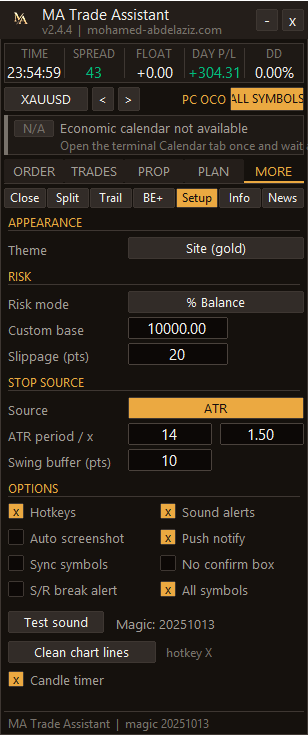
Site (gold) 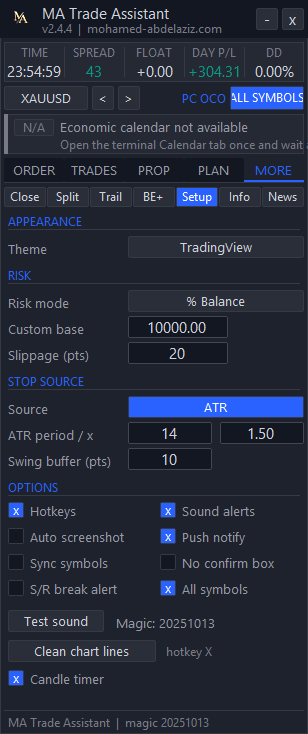
TradingView 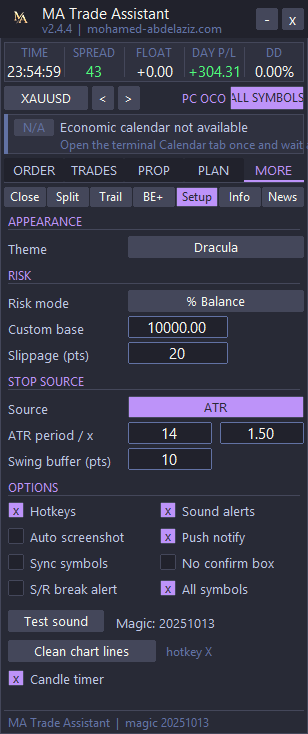
Dracula
Free Download & MetaTrader 5 Setup
Install free in one click from the official MQL5 Market, attach it to your chart in MetaTrader 5, and enable Algo Trading.
- Source
- MQL5 Market
- Version
- 2.5.2
- Size
- 574 KB
- Platform
- MetaTrader 5 (desktop)
- Price
- Free
Complete MA Trade Assistant Documentation
The user manual is organised into six focused guides. Jump directly to the topic you need:
- InstallationDownload, install in MetaTrader 5, attach to a chart, and verify live execution.
- Interface and themesThe 5-tab MT5 panel layout and the 6 built-in themes, with real v2.4.4 screenshots.
- Features and workflowRisk-based lot sizing, ORDER, TRADES, PROP and PLAN tabs, draggable partial TPs, and hotkeys.
- Settings and advanced optionsMORE tab controls: trailing stop, partial take profit, break-even, news guard, setup, and F7 inputs.
- FAQ and troubleshootingVerified answers and fixes for common MetaTrader 5 setup and execution issues.
- Risk and limitationsRisk disclosure, technical limitations, prop firm rules scope, and what the tool does not do.
Frequently Asked Questions About MA Trade Assistant
- Is MA Trade Assistant free?
- Yes. It is free to use for personal trading. The file is compiled, so the source code is not published.
- Does it trade automatically or give signals?
- No. It does not open trades on its own and it does not give buy or sell signals. You decide every trade. The panel calculates, checks and manages.
- Does it work for MetaTrader 4?
- No. It is made for MetaTrader 5 only.
- Which risk modes are available for the lot size?
- Eight: a currency amount, percent of balance, percent of equity, percent of free margin, percent of a custom base, and percent of the previous day, previous week or previous month balance.
- Does it connect to my prop firm?
- No. You enter the rules of your challenge yourself (initial balance, target, daily loss, maximum drawdown, minimum days). It is not affiliated with any prop firm, and you must always check the official rules of your firm.
Discover how different charting types — from Time and Tick to Volume Profile and Footprint — change your market perspective and execution.
Free MA TradeLab (v2.5.3): Institutional trading journal, personal & trading financial management, prop firm risk engine (PFIE), studio audio news alerts, and direct localhost syn…
A structured approach to understanding how markets really move — through order flow, volume, and liquidity.
Trading Risk Disclosure
Trading leveraged products carries a high risk of loss. This is a manual trade-management utility, not financial advice and not a signal service. Test on a demo account first.